A lot of teams repeat the same line: use Debug while developing, use Release when you ship.
That’s not wrong, but it hides something more important: the difference between Debug and Release isn’t a single switch — it’s a change across the entire toolchain’s behavior. You see one dropdown in the IDE, but behind it you’re actually changing macro definitions, optimization strategy, linking, symbol handling, runtime checks, binary layout, observability, timing characteristics, and ultimately how expensive it is to root-cause an incident.
So this article doesn’t just answer “what are the differences” — it also answers why each difference exists, what misjudgments it causes, how to verify it, and when you should flip the default the other way.
The article uses Visual Studio C/C++ projects as the main thread, with .NET as a parallel comparison, to help you build one unified way of thinking about this.
If you only remember one sentence, remember this one:
Debug and Release are fundamentally two different optimization targets. Debug optimizes for diagnosability; Release optimizes for runtime quality and delivery quality.
1. Get your frame of reference right first: in Visual Studio, which Debug/Release differences are defaults, and which ones you configured yourself
A lot of arguments come from one mistake: treating “default behavior” as “an absolute rule.”
In Visual Studio, the differences between Debug and Release are best understood in three layers: the toolchain’s default tendencies, the project’s own configuration overrides, and the extra behavioral differences that the language and runtime bring on top.
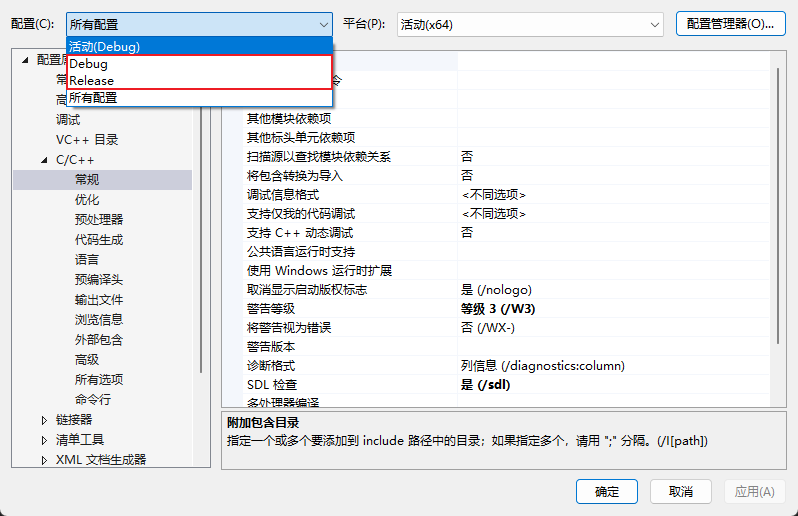
For example, “Release has no symbols” isn’t a universal fact. Many mature teams keep a full PDB for Release — they just don’t ship the symbols publicly alongside the executable. Likewise, “Debug is always unoptimized” isn’t absolute either; you can turn on optimization locally inside Debug to reproduce an issue.
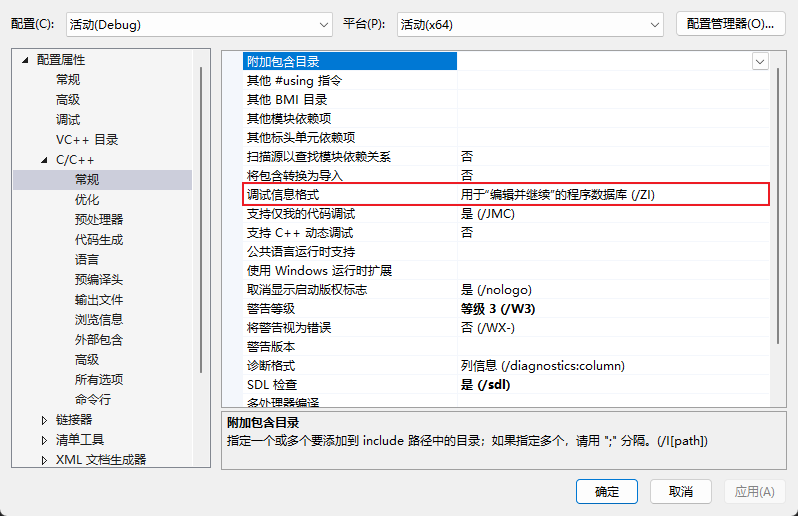
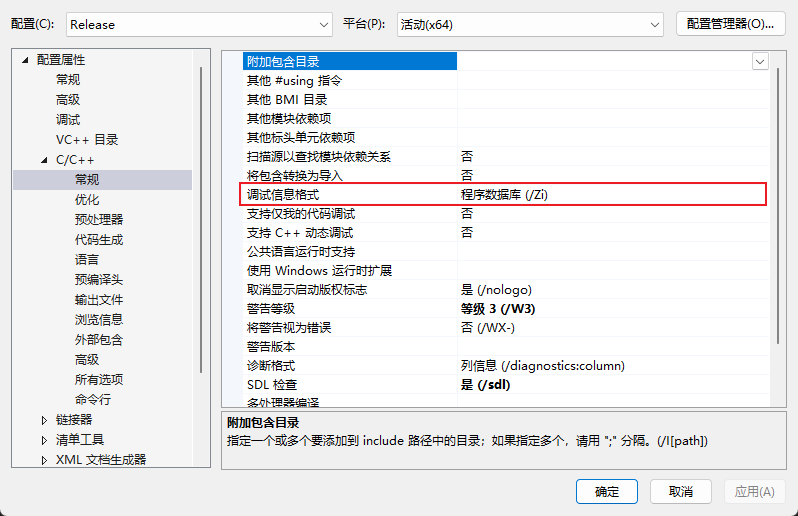
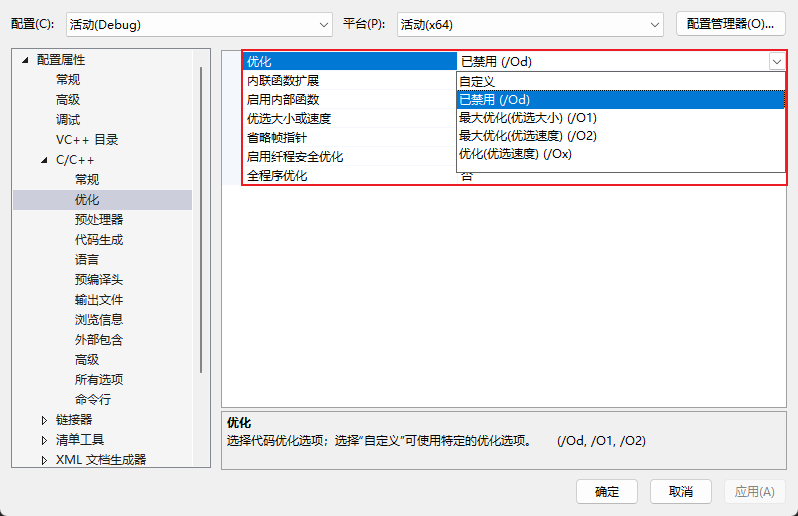
So from here on, each difference will follow the same order: symptom, mechanism, common misjudgment, practical advice. I want the information dense, but I don’t want this to turn into a parameter reference manual.
2. Configuration model differences: Debug and Release aren’t one button — they’re two separate configuration trees
1. Symptom
Once you switch to Release, the behavior change isn’t just performance — often your assertions, logging, crash locations, and even the odds of hitting an exception all shift too.
2. Mechanism
In VS, Debug and Release are two independent configuration nodes, and each one can have its own compiler, linker, preprocessor, output path, and post-build script settings. They’re not “one config with a runtime mode switch” — they’re “two build strategies for the same source code.” Open the .vcxproj project file as text and you’ll find a different world in there.
<?xml version="1.0" encoding="utf-8"?>
<Project DefaultTargets="Build" xmlns="http://schemas.microsoft.com/developer/msbuild/2003">
  <ItemGroup Label="ProjectConfigurations">
    <ProjectConfiguration Include="Debug|Win32">
      <Configuration>Debug</Configuration>
      <Platform>Win32</Platform>
    </ProjectConfiguration>
    <ProjectConfiguration Include="Release|Win32">
      <Configuration>Release</Configuration>
      <Platform>Win32</Platform>
    </ProjectConfiguration>
    <ProjectConfiguration Include="Debug|x64">
      <Configuration>Debug</Configuration>
      <Platform>x64</Platform>
    </ProjectConfiguration>
    <ProjectConfiguration Include="Release|x64">
      <Configuration>Release</Configuration>
      <Platform>x64</Platform>
    </ProjectConfiguration>
  </ItemGroup>
  <PropertyGroup Label="Globals">
    <VCProjectVersion>17.0</VCProjectVersion>
    <Keyword>Win32Proj</Keyword>
    <ProjectGuid>{108e91bb-ae62-4734-963a-fb06d7c8e05c}</ProjectGuid>
    <RootNamespace>DebugDemo</RootNamespace>
    <WindowsTargetPlatformVersion>10.0</WindowsTargetPlatformVersion>
  </PropertyGroup>
  <Import Project="$(VCTargetsPath)\Microsoft.Cpp.Default.props" />
  <PropertyGroup Condition="'$(Configuration)|$(Platform)'=='Debug|Win32'" Label="Configuration">
    <ConfigurationType>Application</ConfigurationType>
    <UseDebugLibraries>true</UseDebugLibraries>
    <PlatformToolset>v143</PlatformToolset>
    <CharacterSet>Unicode</CharacterSet>
  </PropertyGroup>
  <PropertyGroup Condition="'$(Configuration)|$(Platform)'=='Release|Win32'" Label="Configuration">
    <ConfigurationType>Application</ConfigurationType>
    <UseDebugLibraries>false</UseDebugLibraries>
    <PlatformToolset>v143</PlatformToolset>
    <WholeProgramOptimization>true</WholeProgramOptimization>
    <CharacterSet>Unicode</CharacterSet>
  </PropertyGroup>
  <PropertyGroup Condition="'$(Configuration)|$(Platform)'=='Debug|x64'" Label="Configuration">
    <ConfigurationType>Application</ConfigurationType>
    <UseDebugLibraries>true</UseDebugLibraries>
    <PlatformToolset>v143</PlatformToolset>
    <CharacterSet>Unicode</CharacterSet>
  </PropertyGroup>
  <PropertyGroup Condition="'$(Configuration)|$(Platform)'=='Release|x64'" Label="Configuration">
    <ConfigurationType>Application</ConfigurationType>
    <UseDebugLibraries>false</UseDebugLibraries>
    <PlatformToolset>v143</PlatformToolset>
    <WholeProgramOptimization>true</WholeProgramOptimization>
    <CharacterSet>Unicode</CharacterSet>
  </PropertyGroup>
  <Import Project="$(VCTargetsPath)\Microsoft.Cpp.props" />
  <ImportGroup Label="ExtensionSettings">
  </ImportGroup>
  <ImportGroup Label="Shared">
  </ImportGroup>
  <ImportGroup Label="PropertySheets" Condition="'$(Configuration)|$(Platform)'=='Debug|Win32'">
    <Import Project="$(UserRootDir)\Microsoft.Cpp.$(Platform).user.props" Condition="exists('$(UserRootDir)\Microsoft.Cpp.$(Platform).user.props')" Label="LocalAppDataPlatform" />
  </ImportGroup>
  <ImportGroup Label="PropertySheets" Condition="'$(Configuration)|$(Platform)'=='Release|Win32'">
    <Import Project="$(UserRootDir)\Microsoft.Cpp.$(Platform).user.props" Condition="exists('$(UserRootDir)\Microsoft.Cpp.$(Platform).user.props')" Label="LocalAppDataPlatform" />
  </ImportGroup>
  <ImportGroup Label="PropertySheets" Condition="'$(Configuration)|$(Platform)'=='Debug|x64'">
    <Import Project="$(UserRootDir)\Microsoft.Cpp.$(Platform).user.props" Condition="exists('$(UserRootDir)\Microsoft.Cpp.$(Platform).user.props')" Label="LocalAppDataPlatform" />
  </ImportGroup>
  <ImportGroup Label="PropertySheets" Condition="'$(Configuration)|$(Platform)'=='Release|x64'">
    <Import Project="$(UserRootDir)\Microsoft.Cpp.$(Platform).user.props" Condition="exists('$(UserRootDir)\Microsoft.Cpp.$(Platform).user.props')" Label="LocalAppDataPlatform" />
  </ImportGroup>
  <PropertyGroup Label="UserMacros" />
  <ItemDefinitionGroup Condition="'$(Configuration)|$(Platform)'=='Debug|Win32'">
    <ClCompile>
      <WarningLevel>Level3</WarningLevel>
      <SDLCheck>true</SDLCheck>
      <PreprocessorDefinitions>WIN32;_DEBUG;_CONSOLE;%(PreprocessorDefinitions)</PreprocessorDefinitions>
      <ConformanceMode>true</ConformanceMode>
    </ClCompile>
    <Link>
      <SubSystem>Console</SubSystem>
      <GenerateDebugInformation>true</GenerateDebugInformation>
    </Link>
  </ItemDefinitionGroup>
  <ItemDefinitionGroup Condition="'$(Configuration)|$(Platform)'=='Release|Win32'">
    <ClCompile>
      <WarningLevel>Level3</WarningLevel>
      <FunctionLevelLinking>true</FunctionLevelLinking>
      <IntrinsicFunctions>true</IntrinsicFunctions>
      <SDLCheck>true</SDLCheck>
      <PreprocessorDefinitions>WIN32;NDEBUG;_CONSOLE;%(PreprocessorDefinitions)</PreprocessorDefinitions>
      <ConformanceMode>true</ConformanceMode>
    </ClCompile>
    <Link>
      <SubSystem>Console</SubSystem>
      <GenerateDebugInformation>true</GenerateDebugInformation>
    </Link>
  </ItemDefinitionGroup>
  <ItemDefinitionGroup Condition="'$(Configuration)|$(Platform)'=='Debug|x64'">
    <ClCompile>
      <WarningLevel>Level3</WarningLevel>
      <SDLCheck>true</SDLCheck>
      <PreprocessorDefinitions>_DEBUG;_CONSOLE;%(PreprocessorDefinitions)</PreprocessorDefinitions>
      <ConformanceMode>true</ConformanceMode>
    </ClCompile>
    <Link>
      <SubSystem>Console</SubSystem>
      <GenerateDebugInformation>true</GenerateDebugInformation>
    </Link>
  </ItemDefinitionGroup>
  <ItemDefinitionGroup Condition="'$(Configuration)|$(Platform)'=='Release|x64'">
    <ClCompile>
      <WarningLevel>Level3</WarningLevel>
      <FunctionLevelLinking>true</FunctionLevelLinking>
      <IntrinsicFunctions>true</IntrinsicFunctions>
      <SDLCheck>true</SDLCheck>
      <PreprocessorDefinitions>NDEBUG;_CONSOLE;%(PreprocessorDefinitions)</PreprocessorDefinitions>
      <ConformanceMode>true</ConformanceMode>
      <DebugInformationFormat>ProgramDatabase</DebugInformationFormat>
    </ClCompile>
    <Link>
      <SubSystem>Console</SubSystem>
      <GenerateDebugInformation>true</GenerateDebugInformation>
    </Link>
  </ItemDefinitionGroup>
  <ItemGroup>
    <ClCompile Include="DebugDemo.cpp" />
  </ItemGroup>
  <Import Project="$(VCTargetsPath)\Microsoft.Cpp.targets" />
  <ImportGroup Label="ExtensionTargets">
  </ImportGroup>
</Project>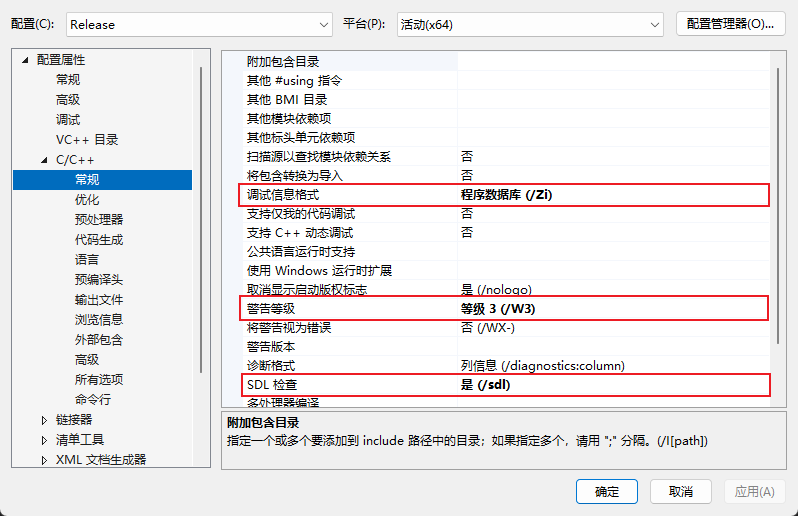
To be more specific, these differences don’t live in just one property page — they’re spread across the solution configuration, project properties, property sheets, imported `.props` and `.targets` files, plus output directories, copy scripts, packaging scripts, and signing scripts. A lot of teams later get stuck on “works locally, breaks in CI” or “the main program is fine, but this one DLL isn’t” — and at bottom, that’s never a language-level problem. It’s that the configuration tree forked somewhere along the way, and nobody managed that fork explicitly.
This kind of fork is especially common in C/C++ projects, because a single solution often has a main program, several static and dynamic libraries, third-party prebuilt libraries, and all sorts of custom post-build steps. They don’t necessarily share one consistent Debug/Release strategy. The moment one project “looks like Release but is secretly still carrying Debug-style settings,” what you end up with isn’t a self-consistent release build — it’s a patchwork of mismatched behaviors.
3. Common misjudgments
- Misjudgment one: assuming the only difference is the optimization level.
- Misjudgment two: assuming every project automatically stays in sync with the solution configuration.
- Misjudgment three: assuming the local IDE configuration is necessarily the same as the CI configuration.
4. Practical advice
- Run a baseline audit of configuration differences on your critical projects — at minimum check preprocessor macros, optimization, linking, symbols, and the runtime library.
- Have CI emit a comparison report of key Debug/Release compiler flags, so you catch “configuration drift” early.
- Write down the reasoning anywhere you deliberately allow a difference, so forks don’t happen by accident.
For senior developers, the step that’s actually worth taking is turning “configuration differences” from manual clicks in the IDE into reviewable, text-based configuration. Even if you’re still using `.vcxproj` and property pages, you should always be able to say clearly: exactly what Release turns on that Debug doesn’t, why each of those options is on, and which settings to check first the moment a problem shows up only in Release.
3. Preprocessor macro and conditional compilation differences: why the same source code turns into two different programs
1. Symptom
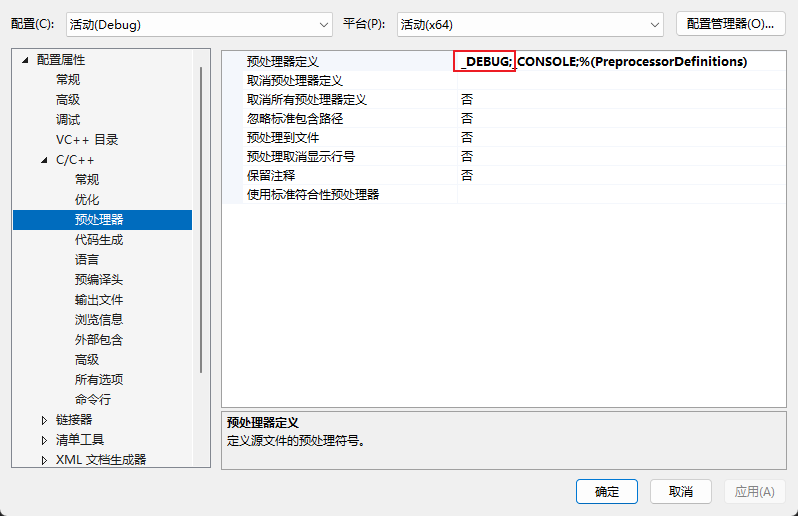
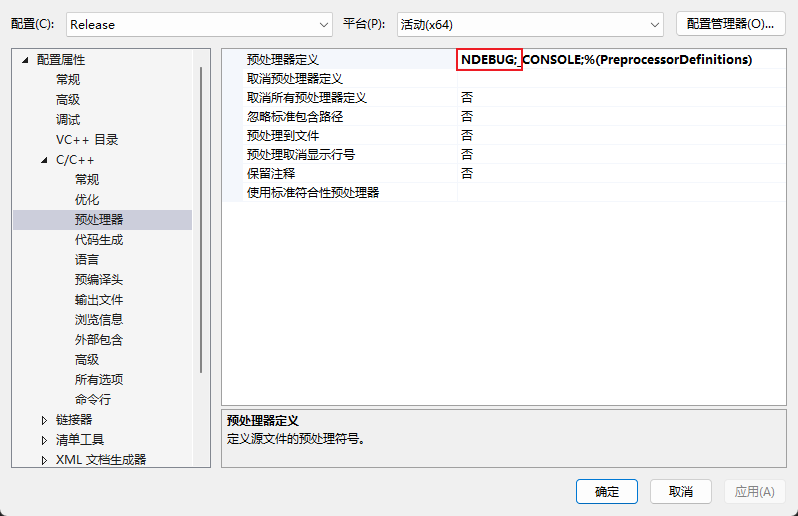
- C/C++ commonly forks on `_DEBUG` versus `NDEBUG`.
- .NET commonly forks on `DEBUG` versus `TRACE`.
2. Mechanism
Conditional compilation trims code paths at compile time. A branch that’s been trimmed doesn’t exist in the output at all — it’s not that it “doesn’t run at runtime,” it’s that it was never compiled in to begin with.
The engineering implications here are huge. A lot of developers read `#ifdef _DEBUG` as “run some extra code while debugging,” but from the compiler’s point of view, a more accurate description is: the debug build and the release build have different control-flow graphs.
Once the control-flow graphs differ, the consequences go well beyond a few extra log lines. Whether some initialization happens at all, whether some bounds check is still there, whether some object’s lifetime got extended, whether some exception-handling path still exists — all of that can change along with it.
So the real danger of conditional compilation isn’t that it makes code ugly — it’s that it quietly creates the illusion that “I verified this locally,” when the release build never actually ran that logic at all.
For C/C++, a common trap is stuffing `assert`, debug logging, argument validation, or even resource initialization into the `_DEBUG` branch. The short-term payoff is a great Debug experience; the long-term cost is that Release’s behavioral boundaries become hard to reason about. The same risk exists in .NET, it just shows up more around `DEBUG`-conditional code and `Debug.Assert`.
3. Common misjudgments
- Treating `assert` as production protection logic.
- Putting necessary initialization inside `#ifdef _DEBUG`, so Release behaves differently.
- Assuming “I verified it locally” is equivalent to “the release build was verified too.”
4. Practical advice
- Assertions should only carry development-time diagnostics, never business correctness.
- Critical business branches shouldn’t depend on conditional-compilation macros.
- After any major change, run at least one pass of unit and integration tests against a Release build.
4. Compiler optimization differences: why Debug seems to “execute the source code as written,” while Release seems to “skip around”
This is the category of Debug/Release difference that’s easiest to underestimate — and easiest to get misled by.
1. Symptom
- In Debug, variable values “look stable”; in Release, they “look like they jump around.”
- In Debug you can step through breakpoints line by line; in Release, lines get skipped, merged, and you can’t step into some local logic at all.
- Some bugs only reproduce in Release.
2. Mechanism
In C/C++, a lot of what separates Debug from Release boils down to a handful of optimization flags.
`/Od` is straightforward: it turns off most optimizations. Its benefit isn’t that the program becomes “more correct” — it’s that breakpoints land more reliably, variables are easier to inspect, and the execution path tracks more closely with the order of the source. That’s why Debug uses it by default.
`/O1` favors size, aiming for smaller code; `/O2` favors speed, aiming for faster code, and Visual Studio’s Release default usually leans this way. `/Ox` is often read as “turn on everything,” but more precisely, it’s an aggressive bundle of speed optimizations, close to `/O2` — don’t read it as “always stronger.” Whether it actually helps depends on the shape of your code and whether the other flags line up with it.
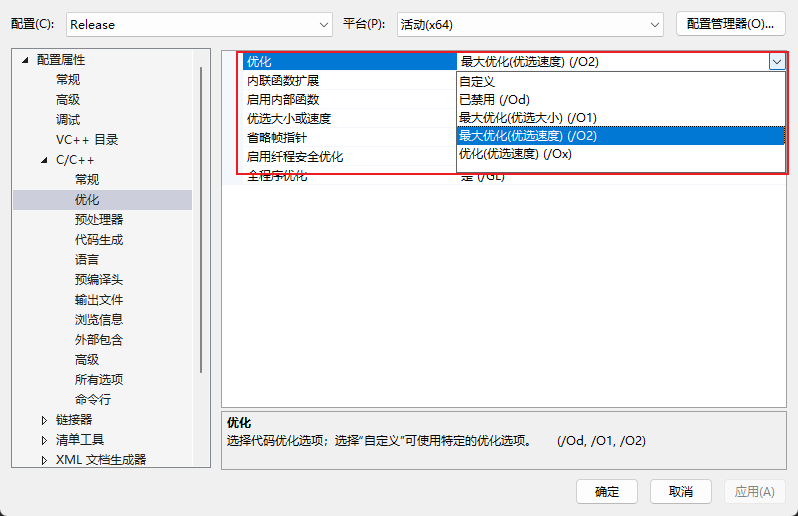
Dig further and `/Ob` controls how aggressively the compiler inlines. `/Ob0` basically doesn’t inline; `/Ob1` leans toward handling explicitly marked inline candidates; `/Ob2` lets the compiler get more aggressive about expanding small functions directly at the call site. `/Oi` lets some function calls get replaced with built-in implementations, saving a call. `/GL` prepares intermediate information for whole-program optimization later — it isn’t the final result by itself, and it usually needs to pair with `/LTCG` at the link stage before cross-file optimization actually happens.
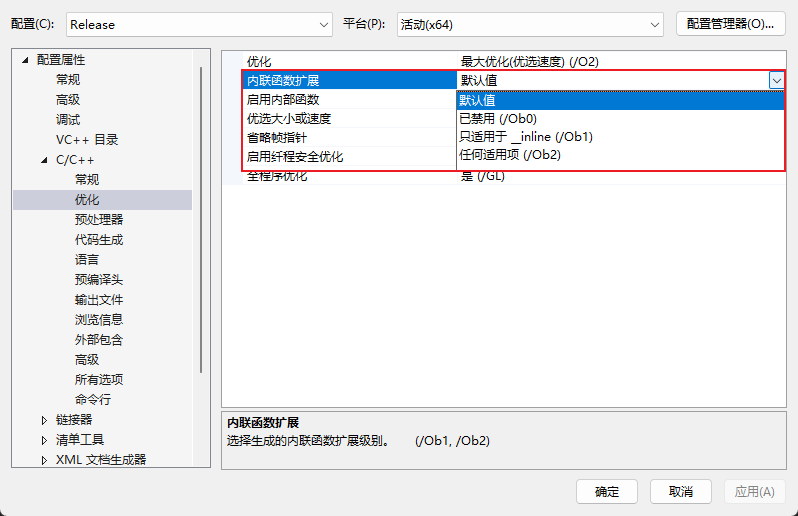
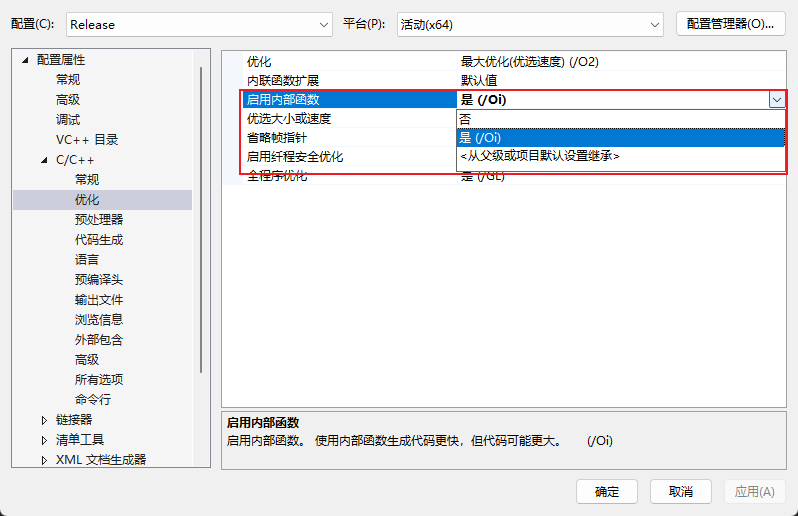
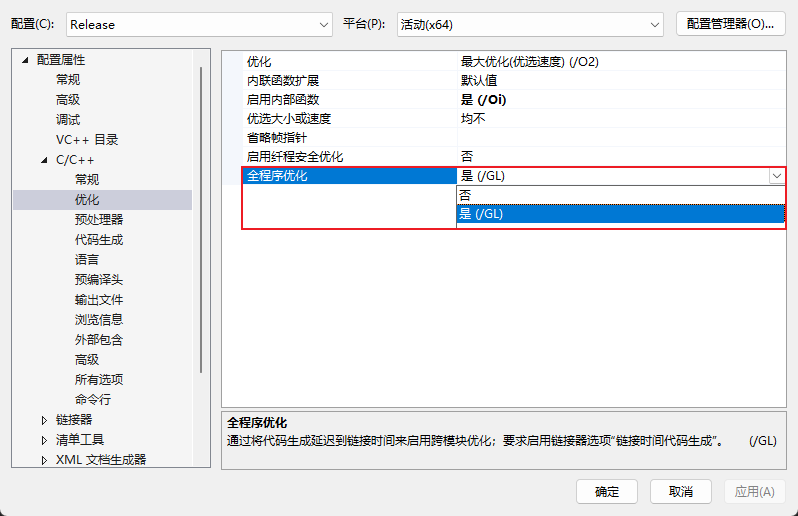
These flags directly change three things: whether a breakpoint still has an independent landing spot, whether a local variable still has a stable storage location, and whether a given function still exists as a standalone function at all. So in Release, what the debugger shows you is usually a “best-effort reconstructed view of the source” — not a line-by-line translation of what the machine is actually executing.
When you’re troubleshooting a Release issue, the useful move isn’t flipping every optimization off at once — it’s figuring out which category of optimization is affecting the problem, then targeting that. Suspect inlining ate the call boundary? Look at `/Ob`. Suspect cross-file optimization changed behavior? Look at `/GL` and `/LTCG`. Suspect a variable got optimized into a register? Don’t treat the variable window as your only evidence.
3. Common misjudgments
- Mistaking “variable not visible / optimized away” for a debugger malfunction.
- Mistaking “breakpoint lands on an adjacent line” for a corrupted binary.
- Attributing “fine in Debug, broken in Release” to a compiler bug, while overlooking undefined behavior.
4. Practical advice
- When reproducing a production issue, build a “debuggable configuration close to Release” first, rather than falling straight back to pure Debug.
- Temporarily lower optimization for a single file or function to do targeted verification, instead of turning off optimization globally and distorting the timing.
- Treat “only shows up in Release” as a high-probability signal for UB, concurrency, or lifetime issues.
If your program involves numerical computation, SIMD, geometry algorithms, or financial calculations, check the floating-point model separately too. “The last few digits differ” in Release can just be normal drift after optimization; but if the result is way off entirely, check first whether the algorithm is overly dependent on evaluation order, before blaming Release.
5. Linking differences: why the same batch of object files link into two different worlds for Debug and Release
1. Symptom
- Release is smaller, symbols are harder to read, and stack traces are sometimes “sparser.”
- Some functions have no identifiable boundary left in the final binary.
2. Mechanism
In Release, the linker often does more aggressive work alongside the compiler:
1. Removes unreferenced symbols.
2. Merges equivalent code sections.
3. Strengthens cross-unit optimization.
4. Turns off incremental linking to get a more stable output.
This doesn’t just affect size and performance — it directly affects diagnostics too.
A few linker flags are worth understanding directly here. `/INCREMENTAL` is incremental linking, more common in Debug — fast, but the output looks more like an intermediate development state. `/LTCG` is whole-program optimization at link time, and it usually shows up paired with `/GL` at the compile stage. `/OPT:REF` strips unreferenced code and data; `/OPT:ICF` merges identical code or data. All of these optimizations are perfectly normal, but they make some function boundaries you’d expect to exist become indistinct in the final image.
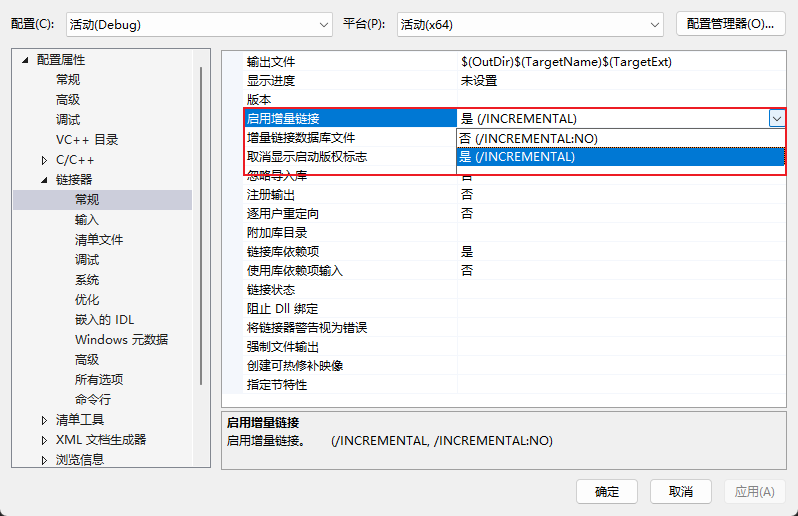
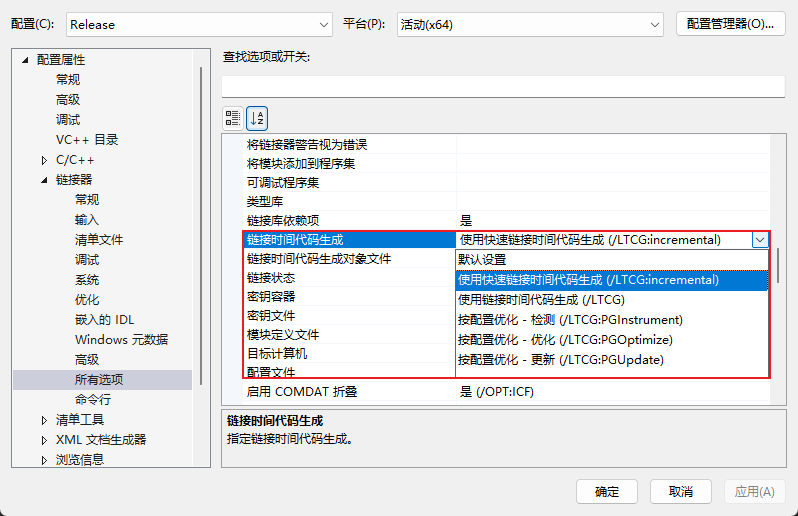
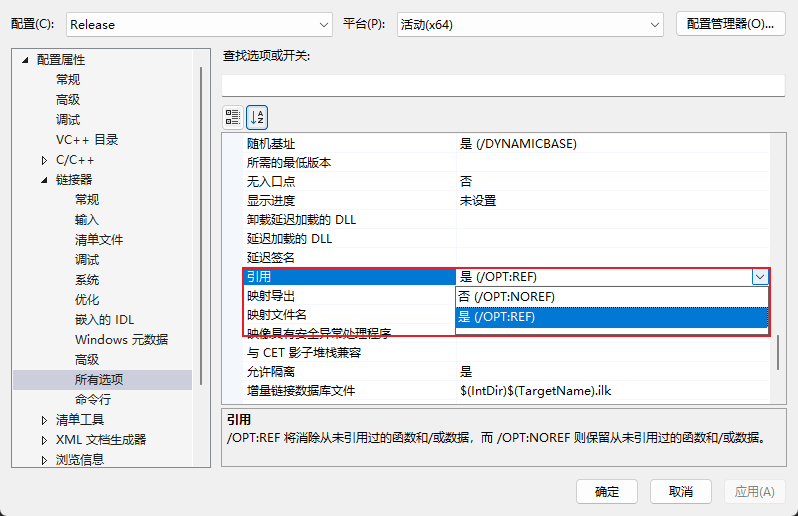
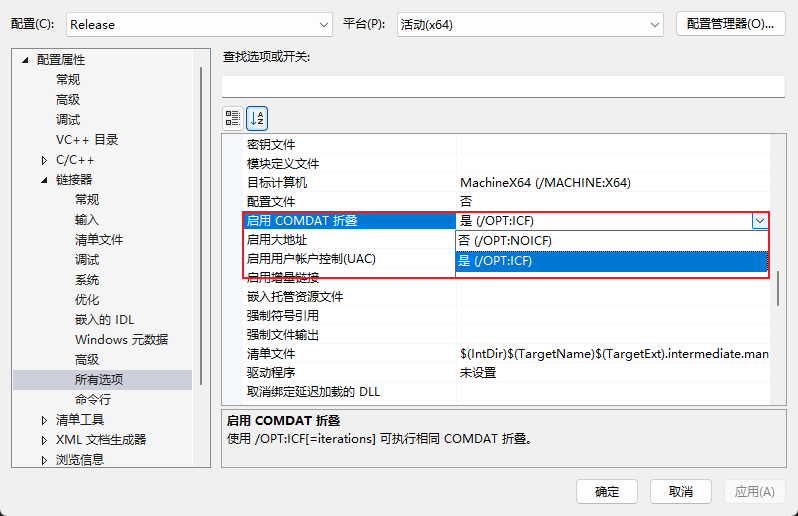
So the linker isn’t just stitching `.obj` files together. By the time you’re in Release, a function you know well from Debug may already have been folded, merged, or simply no longer exist with its original boundary. If you only look at compiler flags during troubleshooting and ignore the linker flags, your conclusion is usually missing half the picture.
3. Common misjudgments
- Assuming “the link stage doesn’t affect debugging.”
- Assuming “having a PDB” guarantees you can fully reconstruct every intermediate state.
4. Practical advice
- Keep a traceable record of linker flags for critical production builds.
- Keep a “diagnosable Release” build pipeline on hand for troubleshooting tricky issues — performance close to the real release, symbols fully recoverable.
6. Symbol and PDB differences: Release isn’t undebuggable — you just need a traceable symbol chain
1. Symptom
- In Debug, locating an issue is smooth; in Release, a crash dump is nearly unreadable.
- The same crash resolves to inconsistent call stacks on different machines.
2. Mechanism
Source-level location depends on the binary matching its symbols exactly. Lost symbols, mismatched symbols, poisoned caches, and version drift can all tank the quality of your post-mortem analysis.
The thing most worth clarifying here: a PDB isn’t “a temporary byproduct you use while debugging” — it’s part of your ability to locate production issues at all. Without matching symbols, a crash dump usually only tells you “something crashed somewhere.” With matching symbols, you can answer which line, which function instance, which call chain crashed.
In the Visual Studio and MSVC world, symbol problems usually come down to four things: whether the build generated enough debug information, whether linking preserved the symbol index, whether archiving bound the binary and the PDB together by build number, and whether the debugger can load the correct version from the correct location when you’re troubleshooting. Get any one of these layers wrong, and the result shows up as “breakpoints acting weird,” “the stack looking weird,” or “I have the source but it doesn’t line up.”
Don’t just memorize the flag names here either. `/Zi` writes debug info to a separate PDB — the most common choice, and the best fit for team collaboration and routine debugging. `/Z7` writes debug info directly into each `.obj`; the upside is a more self-contained object file, the downside is a bigger `.obj`, and in day-to-day projects it’s usually less convenient than `/Zi`. `/DEBUG` at the link stage takes that debug information and assembles it into the final usable symbol output. It isn’t exclusive to Debug — you can turn it on in Release too, and for production troubleshooting, you generally should.
What’s worth taking seriously isn’t “whether to ship the PDB with the installer to customers” — it’s your Release symbol retention strategy. Those are two different things. Mature teams typically keep Release symbols internally, without ever exposing them in the end-user environment.
If your team already has CI/CD, here’s a very practical question: for the build number running in production today, can you find the exactly matching EXE, DLL, PDB, source version, and build parameters within five minutes? If the answer isn’t a clear yes, your Release diagnosability isn’t actually engineered yet.
3. Common misjudgments
- Reading “the release package doesn’t include a PDB” as “the organization doesn’t need to keep a PDB.”
- Assuming matching file names is enough to guarantee a match.
4. Practical advice
- Every Release build must archive its matching symbols in a searchable way.
- Build a one-to-one index between build artifacts and symbols to support crash dump analysis.
- During incident drills, actually verify the full path “from dump to source line” — don’t just take it on paper.
If you have to compress this section into one team rule, it’s this: stop debating “whether to keep the Release PDB” and start discussing how to reliably store it, index it, control access to it, and verify it actually works when you need it.
7. Runtime check differences: Debug can surface a lot of problems for you, but it can’t guarantee Release is correct
1. Symptom
In Debug, you’re more likely to see assertion breaks, bounds-check warnings, and debug-heap alerts; in Release, the same issue might just show up directly as a random crash or corrupted data.
2. Mechanism
C/C++ Debug often turns on extra runtime checks and debug-heap behavior, aimed at surfacing errors as early as possible. Release usually turns off these expensive checks in exchange for performance and stable throughput.
This kind of difference is the easiest to get misled by, because it creates an illusion that Debug is somehow safer. The more accurate way to put it: Debug just complains more.
In C/C++, this difference usually comes down to a handful of switches. `/RTC` is runtime checking, commonly used to catch uninitialized variables, stack corruption, and some suspicious conversions — great for locating issues during development, but it doesn’t play well with heavy optimization, so don’t treat it as representative of real release behavior. `/MDd` and `/MD` link against the Debug CRT and the Release CRT respectively, and they differ in memory allocation, assertions, and debug-heap behavior — so “it didn’t crash in Debug” doesn’t let you conclude “it’s safe in Release” either. Add container checks like `_ITERATOR_DEBUG_LEVEL` on top, and a lot of errors surface much earlier in Debug, while in Release they may not show up until much later, looking more like a random problem.
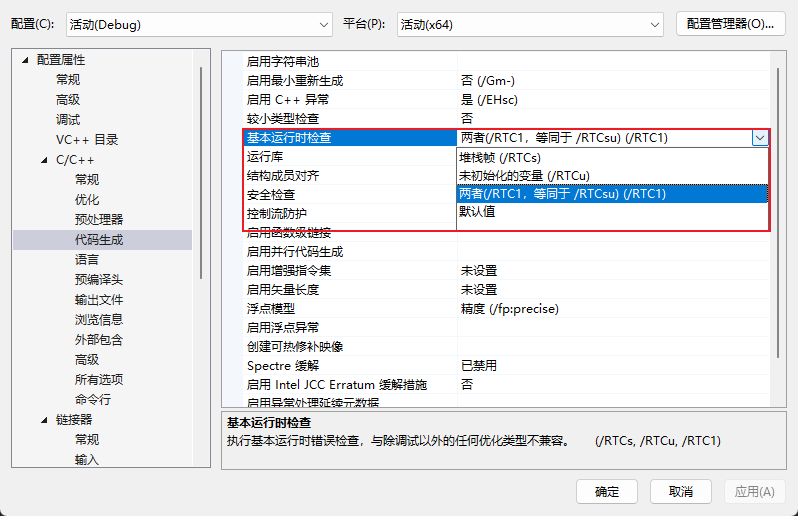
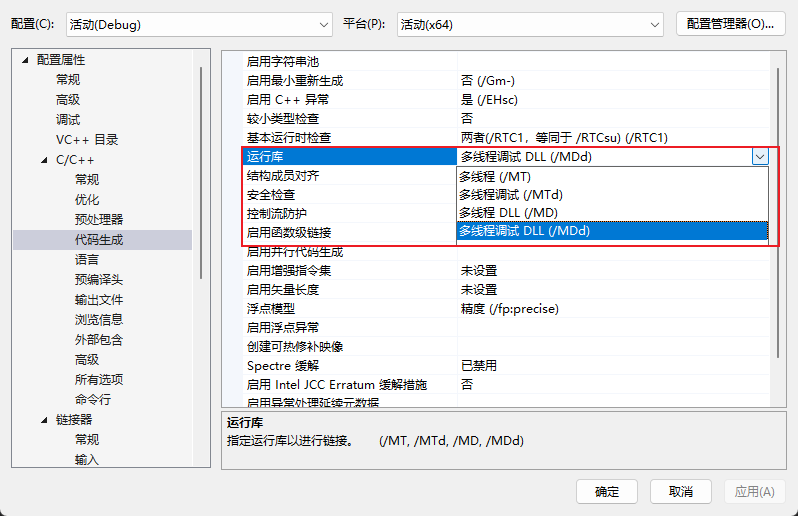
So Debug is more like a lab wired up with lots of alarms — not a world that’s closer to production truth.
For .NET, the runtime’s memory-safety boundary is stronger than native code’s, but that doesn’t mean Debug/Release differences stop mattering. For instance, `Debug.Assert` doesn’t participate in production protection, and JIT optimization can still change what you observe about exception throw locations and local variable state.
3. Common misjudgments
- Mistaking the checks Debug provides for a language-level guarantee.
- Dismissing a production issue as not real just because it doesn’t reproduce in Debug.
4. Practical advice
- For memory and out-of-bounds issues, build an independent sanitizer / static-analysis / stress-testing pipeline instead of relying on Debug alone.
- Keep “the check mechanism exists” and “the code is actually correct” as two separate claims.
8. Iterator debug levels and runtime library differences: why some problems look like “mysterious linker errors”
1. Symptom
- Mixing libraries built with different configurations causes ABI incompatibility, link failures, or runtime crashes.
- Some container-related issues only show up under one specific configuration.
2. Mechanism
The C++ standard library may use different iterator check levels and runtime-library linking strategies in Debug versus Release. Object layout, check semantics, and the binary contract can all shift as a result.
A lot of people get genuinely confused the first time they hit this, because the symptom usually isn’t “the logic here is wrong.” It’s that some library throws LNK2038 the moment you link it in, or a container behaves strangely once it crosses a module boundary, or some code runs fine in one configuration but crashes the instant it touches the STL in another.
The root cause usually isn’t mysterious — it’s just far removed from the business code. What you’ve actually run into is a binary contract mismatch. Debug and Release don’t just differ in their switches; sometimes the object layout, the runtime library choice, and the debug-level constraints differ too. At that point, “syntax-compatible” doesn’t get you to “ABI-compatible.” That’s exactly why senior C++ teams keep repeating: never link together artifacts built with different configurations, and never leave the toolset, runtime library, and build mode of a third-party library vaguely documented.
3. Common misjudgments
- Assuming “matching header files” is enough to guarantee you can link mixed builds.
- Assuming a successful link means ABI compatibility.
4. Practical advice
- Forbid linking Debug and Release versions of static libraries or object files together.
- Make runtime-library and iterator-related settings part of your third-party dependency admission checks.
- Clearly label the build configuration and toolset version on every external prebuilt library.
9. Debuggability differences: you can still debug Release, but the method has to level up from “staring at source code” to “following a chain of evidence”
1. Symptom
- Stepping through locally line by line shows nothing wrong, yet the production dump shows an obvious anomaly.
- The variable window is incomplete, and the relationship between source lines and instructions is loose.
2. Mechanism
Optimization changes local variable lifetimes, register allocation, and instruction mapping. Source-level debugging in Release is more of an “approximate observation” than “line-by-line truth.”
A lot of people get stuck debugging Release not because the tools are actually bad, but because they never switched their method. In Debug, the natural moves are setting a breakpoint, stepping, watching variables. In Release, the more reliable order is: first confirm the build number, module path, and symbol status, then check whether the dump, log anchors, exception code, and call stack line up — and only when you need to, drop down to disassembly, registers, thread stacks, and sampling data.
You’ll find that troubleshooting Release isn’t “you can’t look at the source code” — it’s “you can’t only look at the source code.”
For senior developers, here’s a practical rule of thumb: if a conclusion only holds up under the condition that “the debugger is attached, you’re stepping through, and the variable window is readable,” it’s probably not close enough to production truth yet.
3. Common misjudgments
- Mistaking “Release is hard to debug” for “Release can’t be debugged.”
- Over-relying on stepping through code while ignoring after-the-fact evidence like dumps, ETW, and sampling analysis.
4. Practical advice
- For Release issues, default to “chain-of-evidence debugging”: log anchors + dump + symbols + sampling data.
- Set a clear team convention: explain production issues in the Release context by default, and only use Debug to quickly narrow things down.
10. Undefined behavior and concurrency timing differences: why so many bugs only show up in Release
This is the most important practical chapter.
1. Symptom
- Debug runs fine 100 times in a row; Release crashes occasionally.
- The bug only happens in production under heavy load, and no amount of local stepping reproduces it.
2. Mechanism
Release’s optimization and execution speed amplify two categories of problems:
- Undefined behavior: reading uninitialized memory, out-of-bounds access, dangling references, strict-aliasing violations, and the like.
- Concurrency problems: data races, publish/subscribe ordering mistakes, timing holes caused by the wrong lock granularity.
Debug, being slower, having more checks, and a different memory layout, often ends up “accidentally masking” these problems.
This section matters because it’s almost the core explanatory framework for “fine in Debug, broken in Release.”
1. Why undefined behavior is more likely to surface in Release
Because undefined behavior isn’t an ordinary logic branch that’s “sometimes right, sometimes wrong” — it means the program has already stepped outside the range the language actually guarantees. Once you’re outside that range, the compiler and the runtime no longer promise that your familiar intuitions still hold.
The common examples: reading an uninitialized local variable, touching a freed object or a dangling reference, running off the end of an array or buffer, violating strict-aliasing rules, and accessing an object from the wrong thread or outside its lifetime. In Debug, these may stay hidden because the memory layout is more “stable,” the debug heap has fill patterns, and execution is slower. In Release, they’re much more likely to turn directly into random values, stack corruption, occasional crashes, or silent data corruption.
2. Why concurrency problems are also more likely to surface in Release
Because one of the biggest differences between Debug and Release is execution rhythm. An attached debugger, breakpoints, extra checks, and a lower optimization level all shift the timing of thread switches and the size of race windows. A lot of synchronization assumptions that were already fragile just “happened not to break” in Debug, and only truly surface in Release.
Typical examples: using a plain boolean flag instead of proper atomic synchronization, reading a shared container while assuming “nobody else is writing to it right now,” and relying on log prints, sleeps, or single-stepping to “stabilize” thread ordering.
That’s also why experienced engineers get more suspicious of a concurrency bug when “adding a few log lines makes it stop reproducing” — because the logging itself can change the timing.
3. Common misjudgments
- Reading “can’t reliably reproduce” as “not a code problem.”
- Chalking up “only happens in the customer’s environment” to environmental mysticism.
4. Practical advice
- Attribute Release anomalies to verifiable mechanisms first — skip the mystical explanations.
- Use stress and concurrency tests to widen the problem window, instead of relying on stepping through the IDE alone.
- Add happens-before-level design comments and unit tests to critical concurrent paths.
If you have to give a first read on the spot, the more efficient order is usually: suspect UB first, then suspect races and lifetime issues, then check for configuration drift, and only then consider a compiler defect or an environmental edge case. This isn’t arbitrary — it’s because in real projects, those first three categories hit far more often than “the compiler itself has a bug.”
11. Security hardening and release differences: Release isn’t about “running fast” — it’s about being shippable, accountable, and traceable
1. Symptom
Two builds that both run fine still differ hugely in requirements: Release demands far more than Debug when it comes to security policy, signing, dependency management, and reproducible builds.
2. Mechanism
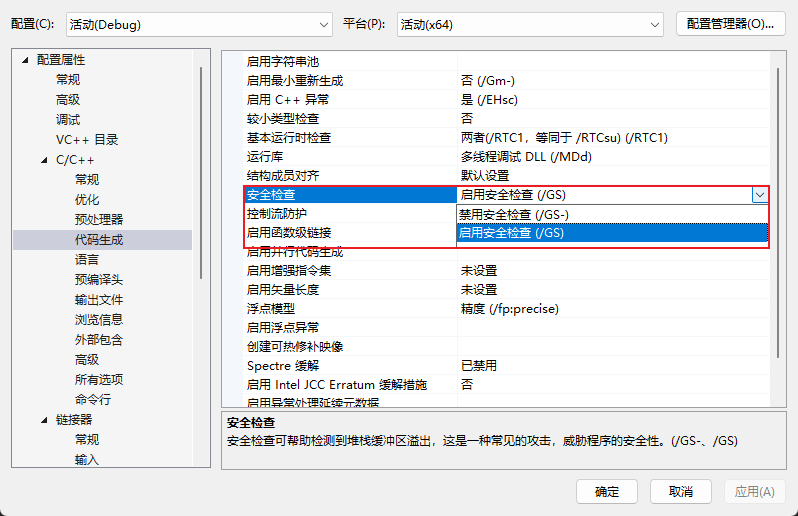
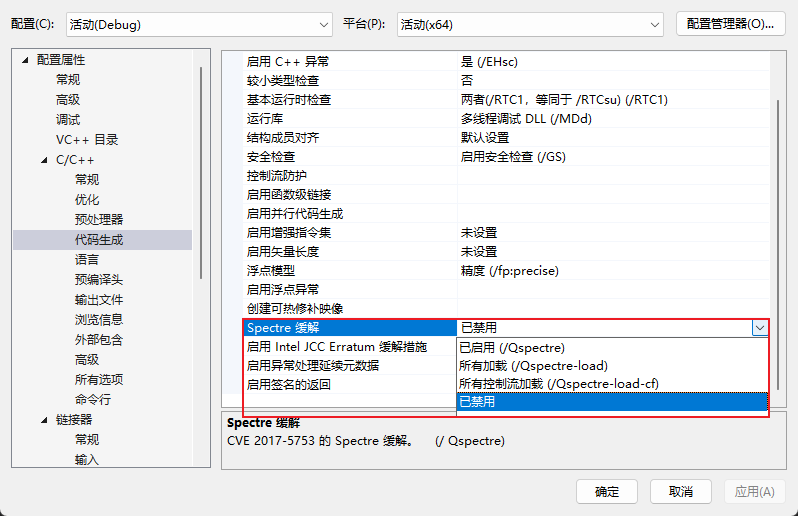
Release faces the real threat surface and real delivery accountability, so it typically turns on stricter mitigations and artifact-governance processes — things like stack protection, control-flow guard, signing and version stamps, dependency locking, and so on.
You need to be able to answer three things: whether security mitigations are enabled, whether the artifact is auditable, and whether you can trace back after an incident. If a Release artifact breaks in production and you can’t confirm which commit built it, which dependencies and compiler flags it used, or locate its matching symbols, that artifact is still unqualified from an engineering-management standpoint — no matter how well it runs.
For C/C++ projects, settings like `/GS`, control-flow guard, and Spectre mitigation libraries should at least follow a consistent policy. For .NET projects, publish options like trimming, single-file, self-contained, ReadyToRun, and AOT can significantly change final runtime behavior and failure modes too. These don’t necessarily fall under the traditional sense of “Debug/Release differences,” but in real teams, they usually get introduced right alongside Release anyway.
3. Common misjudgments
- Treating Release as nothing but a performance mode, while ignoring supply-chain security and audit traceability.
4. Practical advice
- Make “security and traceability” a hard gate in the release pipeline.
- Make sure every production artifact can be traced back to its source version, compiler flags, and symbol package.
12. .NET comparison: same Debug and Release, so why do the concerns overlap with C++ in some ways and diverge in others
Here’s the minimal comparison view for cross-stack teams.
1. Similarities
- Both have conditional-compilation symbol differences.
- Both see optimization affect debuggability.
- Both need a working symbol and diagnostic chain maintained for Release.
2. Differences
- .NET’s runtime layer (JIT, tiered compilation, PGO, ReadyToRun/AOT) has a more pronounced effect on behavior.
- Some differences come from the publish configuration, not just the IDE build configuration.
- Memory-safety semantics are stronger in a managed environment, but concurrency, timing, reflection, and trimming issues remain significant.
If you compress the difference between C++ and .NET into one sentence: C++ is more likely to break at the level of “language undefined behavior” and “ABI contracts,” while .NET is more likely to break at the level of “runtime optimization strategy” and “publish-shape changes.”
3. Advice for teams
What cross-stack C++/.NET teams should really share isn’t terminology — it’s an evidence standard: whether the issue reproduces in a Release context, whether you can pull matching symbols for the corresponding build, and whether the final conclusion has a repeatable verification path. As long as those three things line up, cross-stack communication stops being two people talking past each other.
13. Rules to put into practice for your team: turning individual experience into engineering capability
- Dual-configuration testing policy: core modules must run automated tests under both Debug and Release.
- Diagnosable-Release policy: release builds retain symbols and keep dumps replayable.
- Configuration-baseline policy: critical compiler and linker flags go through code review.
- Incident-review policy: every incident that “only triggers in Release” gets tagged with a root-cause category (UB, concurrency, configuration drift, symbol chain, etc.).
- Toolchain-upgrade policy: run a round of differential regression testing whenever you upgrade VS or the toolset.
Conclusion
The difference between Debug and Release isn’t as simple as “debug mode versus the real mode” — it’s a systematic tradeoff between two different objective functions.
For junior developers, the most important thing is building the right troubleshooting order: evidence before guesses; confirm the build and symbols before you argue about code logic.
For senior developers, the most important thing is upgrading these differences from “personal experience” into “organizational capability”: a unified configuration baseline, a traceable symbol strategy, and a testing and diagnostic process that lives in the Release context.
Once a team actually nails those three things, the gap between Debug and Release stops being an amplifier for production incidents, and becomes the guardrail that keeps your delivery stable instead.
Appendix: The full list of Debug/Release differences
A. Configuration and conditional compilation
- General: Debug/Release are two independent configuration trees.
- Configuration-dependent: each project can override solution-level settings.
- C++: `_DEBUG` and `NDEBUG` affect conditional-compilation branches.
- .NET: `DEBUG` and `TRACE` affect conditional code and diagnostic behavior.
B. Compiler optimization and code generation
- C++/configuration-dependent: Debug commonly uses `/Od`; Release commonly uses `/O2` or `/Ox`.
- C++/configuration-dependent: Debug typically inlines little; Release typically inlines aggressively (e.g. `/Ob2`).
- C++/configuration-dependent: Release more often enables intrinsics and cross-unit optimization (e.g. `/Oi`, `/GL`).
- C++/configuration-dependent: the floating-point model may differ (e.g. `precise` vs `fast`), affecting numerical details.
- .NET/configuration-dependent: Release typically enables `Optimize code`.
- .NET/configuration-dependent: tiered JIT, PGO, ReadyToRun, and AOT are further shaped by the publish configuration.
Quick reference:
- `/Od`: turns off optimization, prioritizes debuggability.
- `/O1`: prioritizes size.
- `/O2`: prioritizes speed, the common Release default.
- `/Ox`: an aggressive bundle of speed optimizations — not the same as “always better than `/O2`.”
- `/Ob0`: inline as little as possible; `/Ob1`: only handle explicitly marked inline candidates; `/Ob2`: let the compiler freely decide more inlining.
- `/Oi`: replace some function calls with built-in implementations.
- `/GL`: prepares intermediate information for whole-program optimization at link time.
C. Linking strategy
- C++/configuration-dependent: Debug more often uses incremental linking; Release more often turns it off.
- C++/configuration-dependent: Release more often enables link-time optimization (`/LTCG`).
- C++/configuration-dependent: trimming unreferenced code and folding identical code are more common in Release.
- C++/configuration-dependent: linker options like subsystem, entry point, and manifest may differ between the two configurations.
Quick reference:
- `/INCREMENTAL`: incremental linking, fast during development, usually off for release.
- `/LTCG`: whole-program optimization at link time, usually paired with `/GL`.
- `/OPT:REF`: strips unreferenced code and data.
- `/OPT:ICF`: merges identical code or data.
D. Symbols and diagnosability
- General: breakpoint binding and dump analysis depend on an exact binary-to-symbol match.
- C++/configuration-dependent: the compile-time debug information format (e.g. `/Zi`, `/Z7`) affects PDB output and build throughput.
- C++/configuration-dependent: link-time debug information options (e.g. `/DEBUG`) determine symbol availability.
- .NET/configuration-dependent: the PDB type (portable/full/embedded) affects the diagnostic chain.
- General/configuration-dependent: symbol server, cache, and retention policies affect the quality of post-incident analysis.
Quick reference:
- `/Zi`: debug info goes into a separate PDB, the most common choice on teams.
- `/Z7`: debug info goes into the `.obj`, making it more self-contained but larger.
- `/DEBUG`: generates the final usable symbol output at link time — worth keeping for Release too.
E. Runtime checks and assertions
- C++/configuration-dependent: runtime checks (e.g. `/RTC`) are common in Debug and don’t pair well with heavy optimization.
- C++/configuration-dependent: the Debug CRT and Release CRT behave differently (e.g. `/MDd` vs `/MD`).
- .NET/configuration-dependent: `Debug.Assert` shouldn’t carry business-protection duties in Release.
- General: the debugger’s first-chance exception experience isn’t the same as production behavior with no debugger attached.
Quick reference:
- `/RTC`: development-time runtime checking, good for catching early errors, not representative of real Release behavior.
- `/MDd`: links the Debug CRT, stronger diagnostics, behavior doesn’t match the release environment.
- `/MD`: links the Release CRT, closer to the real release environment.
F. Memory, containers, and ABI
- C++/configuration-dependent: differences in `_ITERATOR_DEBUG_LEVEL` affect container checking and compatibility.
- C++: mixing Debug and Release artifacts commonly causes ABI conflicts or link failures.
- C++: debug-heap fill values and allocation strategy can either mask or amplify memory problems.
- C++/configuration-dependent: whether diagnostic tools like ASan are enabled is usually tied directly to the configuration.
G. Debugging experience differences
- General: in Release, the mapping between source lines and actual instructions is looser.
- C++: inlining, register allocation, and frame layout changes affect stepping and variable visibility.
- .NET: JIT optimization can make local variables invisible, reorder statements, and change the breakpoint experience.
H. Timing and concurrency
- General: the execution-speed gap between Debug and Release changes race windows.
- C++: optimized memory access and instruction scheduling make data races surface more easily.
- .NET/configuration-dependent: the warm-up and steady-state phases are more noticeably affected by the tiered-compilation strategy.
I. Security and release
- C++/configuration-dependent: security options like stack protection, CFG, and Spectre mitigations need a consistency policy checked across both configurations.
- .NET/configuration-dependent: trimming, single-file, self-contained, and AOT publishing have a real effect on behavior and reflection compatibility.
- General: signing, version stamping, and artifact integrity are usually only strictly enforced in the Release pipeline.
J. Test and performance-conclusion validity
- General: performance conclusions should be based on Release or a near-release build.
- General: passing functionality in Debug doesn’t mean correctness passes in Release.
- General: benchmark conclusions are usually distorted when a debugger is attached.